App Gateway
Portal launch for selected apps
With App Gateway, the user opens the portal, chooses an app available to them and receives a short-lived app session. The internal address stays behind the connector.

Access for contractors, partners and BYOD users
When someone needs CRM, an admin panel or a partner portal, a device VPN gives them more network than the task requires.
BusinessProxy opens only the approved app or work site in the browser. The network stays closed, sessions are time-limited, access is revocable, and administrators see active work paths. In Zero Trust terms, it is web-app access without placing the whole device on your network.
The portal opens selected internal apps. The browser extension adds browser-scoped policy, session binding and selected content-protection controls for desktop work browsing.
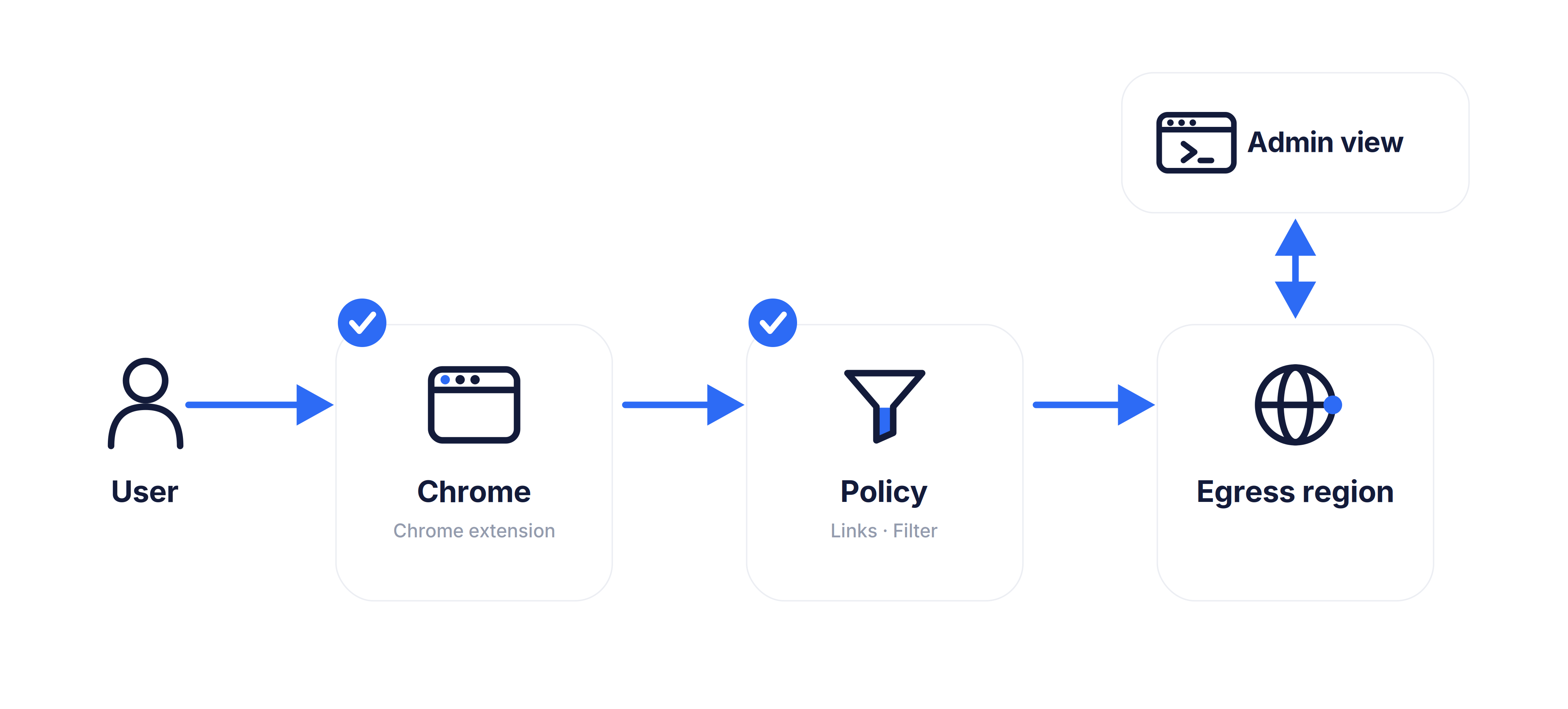
Two access paths
Use the portal for selected internal web apps. Use the extension when you need a managed browser route for work web services.
App Gateway
The user signs in to BusinessProxy, sees the internal web apps granted to them and opens the app in the browser. BusinessProxy issues a short-lived app session and routes it through the outbound connector.
How portal access works →
Managed Browser Access
For supported desktop browser profiles, the extension applies the proxy route, receives short-lived proxy credentials and lets admins revoke active browser sessions.
Managed browser access →
Why BusinessProxy
When an outside user needs CRM, an admin panel or a partner portal, the decision should be about that app session: who, which app, for how long, and how access ends.
See how we compare →Scoped by design
How it works
A user signs in, opens an approved work path, and every active session remains visible to administrators.
App Gateway
With App Gateway, the user opens the portal, chooses an app available to them and receives a short-lived app session. The internal address stays behind the connector.
Managed browser
For managed browsing, the browser extension applies routing policy, receives temporary access data and keeps the session tied to the signed-in user.
Security
What the gateway sees — and what it doesn't.
Use cases
Internal apps
Let outside users open assigned internal web apps from the BusinessProxy portal, without giving their device a route into your network.
Contractors
Use the browser extension when project work needs a managed browser route, domain policy, traffic limits and session history.
CMS and ERP admins
Protect CMS, commerce and ERP admin areas before the login form: users enter through BusinessProxy, while the app keeps its own accounts and roles.
BYOD
Keep work browsing accountable on personal laptops while personal apps, calls, banking, and local tools stay outside the proxy route.
QA testing
Run public web checks through an approved egress region with session history and traffic limits.
Support & Ops
Give support and ops teams a stable managed browser path for SaaS without breaking calls or non-browser work.
Business controls
Invite users, assign access, revoke sessions and review activity without running a separate network-access project.
Evidence
The managed browser path governs access by domain, metadata and configured policy without decrypting HTTPS page content. App Gateway relays selected app traffic at the web layer through the connector. Security model →
Example scenario
An ecommerce team can require an active authorized session before anyone reaches order data or admin areas. When managers leave the company, old account knowledge alone is not enough: administrators can end active sessions and remove future access from the workspace.
Pricing
Start with a controlled work-access demo. Teams is per-seat with browser policy and audit. App Gateway publishes internal apps through an outbound connector group; Partner Access adds the multi-client layer.
A controlled work-access demo: approved domains or a demo app, never general internet.
$0
For freelancers and external professionals working across multiple clients; personal internet stays direct.
$9 per month
Per-seat managed access for teams that need policy, seats and an audit trail without an enterprise rollout.
$12 per user per month
FAQ
No. BusinessProxy does not install a device VPN and does not route the whole machine. It manages a browser path through the BusinessProxy browser extension. Non-browser traffic, local apps, calls and other browsers stay outside the BusinessProxy path.
Yes. Users need the BusinessProxy browser extension for a supported desktop browser. The point is that there is no OS-level agent and no device-wide VPN client. Enforced deployments require customer-managed browser or device policy validation.
Not on the browser-proxy path. BusinessProxy enforces browser policy using domains, network metadata, category decisions and allow/deny rules. It does not decrypt HTTPS page content, read the page DOM, or inspect form fields on that path.
Yes, outside the managed browser path. On an unmanaged device, a user can use another browser, another unmanaged profile, or remove/disable the extension. If bypass prevention matters, validate the browser package through customer-managed browser or device policy before rollout.
No. Account login and proxy access use different credentials. Session credentials are random and short-lived. BusinessProxy validates them with a server-side keyed one-way digest and does not store the raw session credential or reuse the account password.
No. BusinessProxy is for accountable work browsing and controlled web testing. It is not an anonymity network, scraping platform, unblock tool, or way to evade terms or legal restrictions.
Tell us which internal web apps, users and browser controls you need. We will map the portal flow, extension flow, connector placement and session controls.