
Choosing an approach
A web application, selected browser domains or a network?
Assign a CRM in the portal when an employee needs to open it in a browser. Use Browser Proxy for selected websites. SSH, RDP and other network connections require a VPN or another access solution.
Compare the tasks each approach supports
| Task | BusinessProxy | VPN |
|---|---|---|
| Open a specific internal web application | Connect the web application through a connector and assign it to an employee to open in a browser | Provide network reachability; routing and network rules define the boundary |
| Route selected browser domains | Use Browser Proxy with an extension and a work-domain policy | Use split tunnelling, policy routing or other capabilities of the chosen VPN |
| Reach SSH, RDP or other network protocols | Does not provide SSH, RDP or arbitrary network-protocol access | Suitable when the required protocols and network segmentation are supported |
| Remove access to one published web application | Remove the permission and end the BusinessProxy session | Depends on network ACLs, segmentation and the solution’s controls |
| Manage device configuration and posture | Use your device-management tools for device checks | Device checks vary by VPN product and agent |
Give employees browser access to the internal CRM
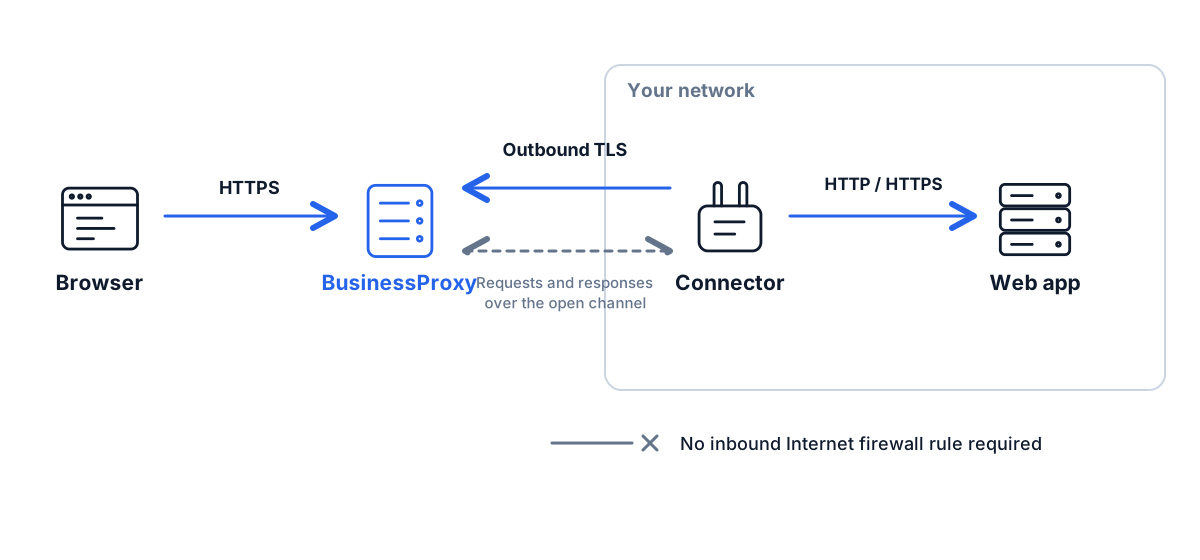
A person opens the published web application in the portal. The connector reaches its internal address.
Connect a CRM, internal portal, admin console or test environment through a connector. Invite the employee and assign the web application. It opens in a browser without adding a route into your network on their device.
Keep a suitably segmented VPN for broader network tasks. Selected web applications can use their own managed entry point alongside it.
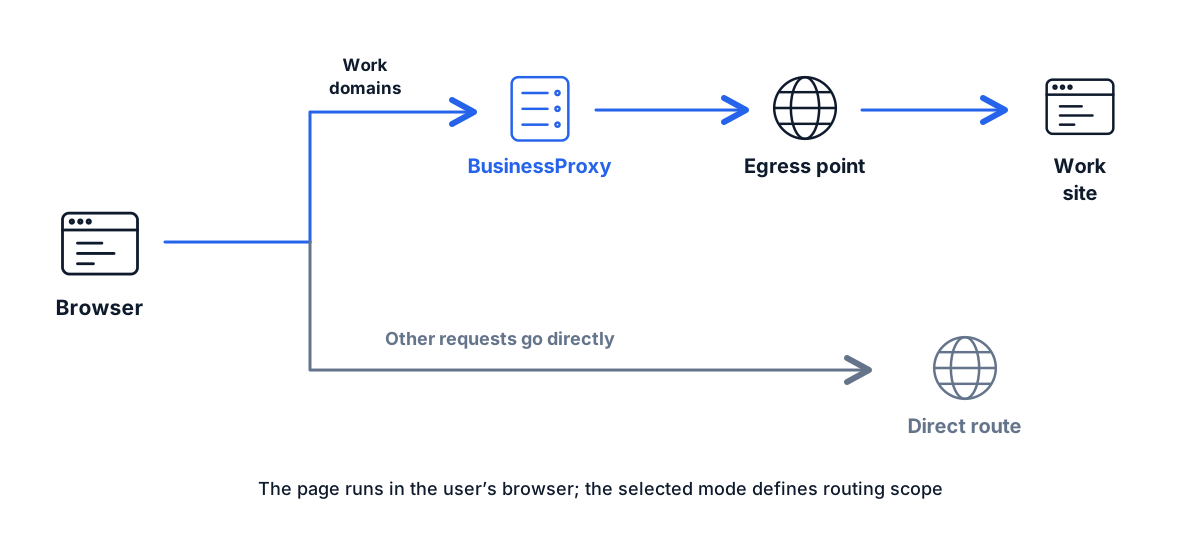
When browser routing is the right fit
List the websites that should use a chosen egress location and install the extension in the work browser.
Choose domains and an available egress location. Use a separate browser profile for work websites on a personal laptop.
Agree on supported browsers and installation. Use managed deployment when settings must be enforced.
Device posture, DLP and endpoint protection continue to do their own jobs. Browser routing adds a focused control to that setup.
Test the choice on one resource
Describe the resource
Is it a web interface or another protocol? Is it internal or public? Does sign-in or file handling use additional domains?
Choose the access boundary
One web application, selected browser domains or a network segment. Record device requirements separately.
Test work and revocation
Complete a normal user task, revoke access and check any alternative paths that remain authorised.
Price the setup you actually need
PAYG has three units: a web application, a CMS site and a Browser Proxy user. Each service accrues charges from enablement until you pause it. Closing a tab or signing out does not stop billing.
Choose how people will reach your web applications
Tell us what employees and contractors need to reach. We can review the options against your architecture.